macOS utility · Intel & Apple Silicon

Your cracked monitor isn't dead.

ScreenBoundary draws around the broken glass and turns the intact areas into real, independent displays — for the price of dinner, not a $300–600 repair.

macOS 13+ · Intel & Apple Silicon · Notarized · Instant download

Screen's fine, just huge? → Split your ultrawide

ScreenBoundary — live demo
Saves $300–600vs a screen repair
Works around the crackdraw on the good glass
Auto-revert safetyon every activation
~30-second setupdrag zones · click Enable
01 — Setup
How it works

Three steps. Then your Mac just treats it as two displays.

ScreenBoundary — Calibrate
2048 × 1280
Zones Zone 1 + Add zone
STEP 01

Draw around the damage

Drag zones over the glass that still works. Diagonal crack down the middle? Make a zone on each side.
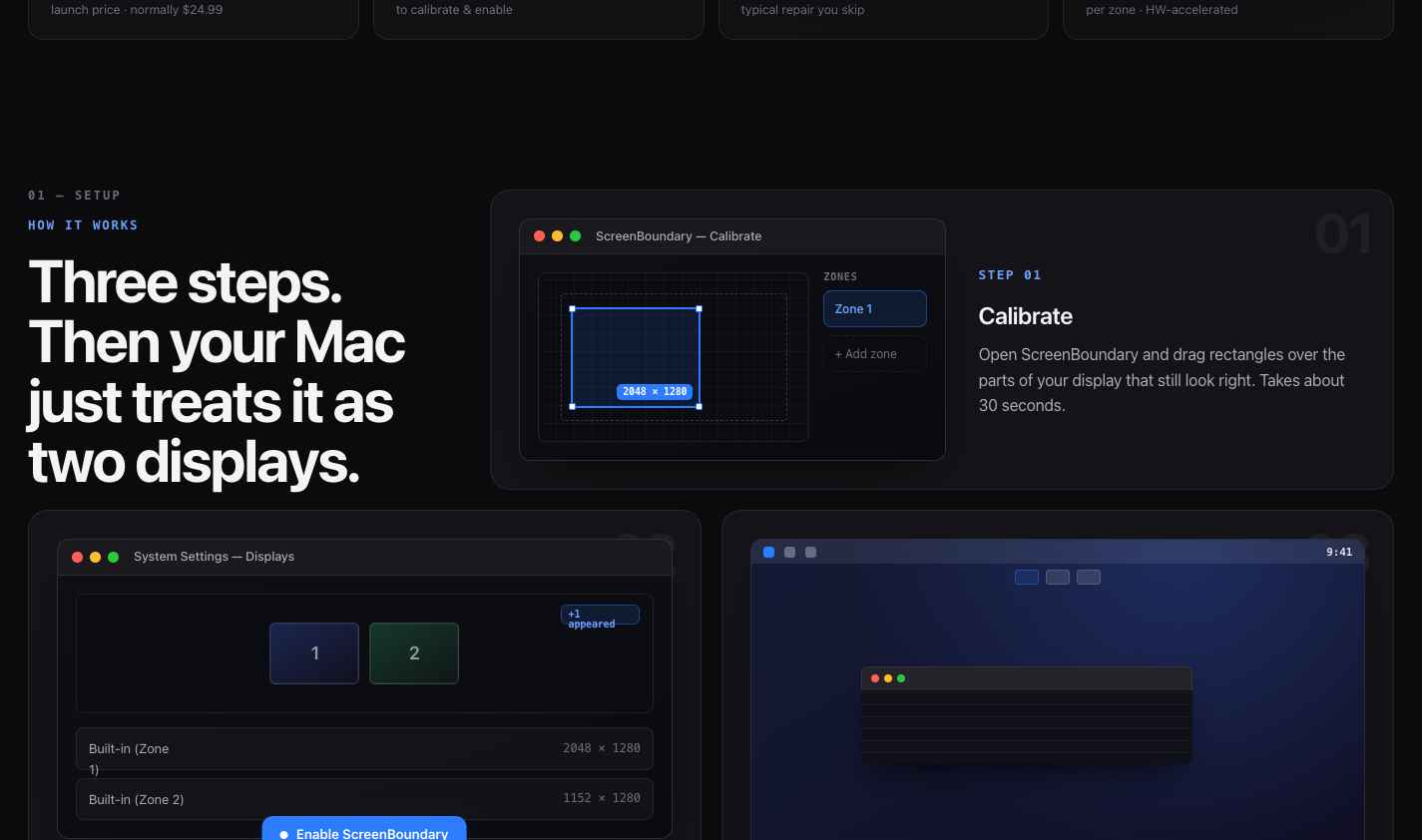
System Settings — Displays
1
2
+1 appeared
Built-in (Zone 1)2048 × 1280
Built-in (Zone 2)1152 × 1280
Enable ScreenBoundary
STEP 02

Black out the break

The damaged area is masked. macOS only ever sees the good regions, each as its own real display.

9:41
STEP 03

Built-in failsafe

Every activation shows a resolution-style countdown. If anything looks wrong, it reverts itself — no emergency-shortcut homework.

02 — In action
See it in action

From a broken panel to a setup worth keeping.

ScreenBoundary · live preview
ScreenBoundary showing the calibration zone editor, System Settings with two virtual displays appearing, and the resulting dual-display workspace
03 — Compare
How it compares

The only one built for a screen that's already broken.

Mirroring tools and adapters weren't made for a dead region. ScreenBoundary was.

Comparison
ScreenBoundary BetterDisplay /
DisplayBuddy
DisplayLink
Visual zone calibration (~30 sec) manual setup
Auto-revert failsafe built in
Multiple zones from one panel
Real displays — own menu bar, Spaces, fullscreen Pro, stream
One-time · from $12.99 Pro, $19.99 subscription

Not on the Mac App Store — ScreenBoundary uses a private macOS API, so it ships as a notarized app signed with a registered Apple Developer ID.

The math

$12.99 now.
Or $300–600 later.

Screen repairs don't get cheaper. ScreenBoundary gets you working again today — and if it's not right for your setup, full refund within 30 days.

Get ScreenBoundary — From $12.99
Screen repair
$300–600
Weeks without your Mac · data risk · no guarantee
or
ScreenBoundary
$12.99
Works in 30 sec · 30-day refund · keep your Mac
04 — Questions
Questions

Everything you'd ask before clicking buy.

Will it work with my specific crack pattern?

As long as part of your screen still displays correctly, you can define a zone around it. The crack itself doesn't matter — ScreenBoundary only cares about which rectangles still look good.

Does it work on Apple Silicon and Intel?

Yes — macOS 13 (Ventura) and later, on both architectures. On Apple Silicon the per-zone screen capture is hardware-accelerated and runs at up to 60fps with negligible overhead.

Is it on the App Store?

No. ScreenBoundary uses a private macOS API to create virtual displays, which App Store rules don't allow. It's distributed as a notarized app signed with a registered Apple Developer ID, so macOS trusts it on first launch.

What happens when I uninstall it?

The virtual displays disappear and your calibration is removed from UserDefaults. Your physical monitor is completely unaffected — nothing is changed at the hardware or system level.

Can I use it on a working screen to split an ultrawide?

Absolutely. Draw two (or more) zones across a healthy ultrawide and macOS treats each as a true independent display — separate Spaces, menu bars and fullscreen, which mirroring tools don't give you.

Does it drain battery or slow my Mac?

Screen capture runs at up to 60fps per zone. On Apple Silicon this is hardware-accelerated and negligible; on Intel it's light enough for everyday use while you wait on a repair.

What if it doesn't work on my specific setup?

Email us within 30 days and you'll get a full refund — no questions asked, no forms to fill. If ScreenBoundary isn't the right fit for your Mac, you pay nothing.

Can I use it on multiple Macs?

Personal covers 1 Mac, Home covers up to 3. If you move to a new Mac, use Deactivate this Mac in Settings — it frees the seat instantly so you can activate on the new machine. No support email, no forms.

Does it work offline?

Yes. The app activates online once, then works offline for up to 14 days between silent license revalidations. The check happens in the background — you won't notice it.

Can I share just one zone in a Zoom or Meet call?

Yes. Because ScreenBoundary creates real macOS displays, Zoom and Meet let you pick a specific display to share. Pick the zone you want; the rest of your screen stays private.

What if something looks wrong when I enable it?

Every activation shows an auto-revert countdown — the same pattern macOS uses when you change resolution. If anything looks wrong, do nothing and it reverts in 15 seconds. Click Revert to undo immediately. You cannot get your Mac stuck.

Doesn't BetterDisplay also work with damaged screens?

BetterDisplay Pro can stream a virtual screen over the damaged area, but it's manual: calculate a custom resolution for your intact region, then position and zoom the stream until the dead area is out of frame. Their docs warn you can lose control of your Mac and recommend setting emergency keyboard shortcuts first. ScreenBoundary is purpose-built: drag rectangles over the glass that works, click Enable. The built-in failsafe means it's always reversible.

05 — Pricing
Early-2026 launch price

One-time. Yours forever.

Price goes back up after launch — no subscription, ever.

Personal
1 Mac
$12.99

→ $14.99 after launch

Buy — $12.99

Instant delivery by email: download + license key.

Both include
  • Unlimited zones & virtual displays
  • Its own menu bar, Spaces & fullscreen per zone
  • Up to 60fps capture, hardware-accelerated on Apple Silicon
  • Silent over-the-air updates (Sparkle)
  • No account, no iCloud, no data collected
30-day money-back guarantee

Doesn't work on your setup? Email us and you'll get a full refund.

macOS 13+ · Intel & Apple Silicon · .dmg download